
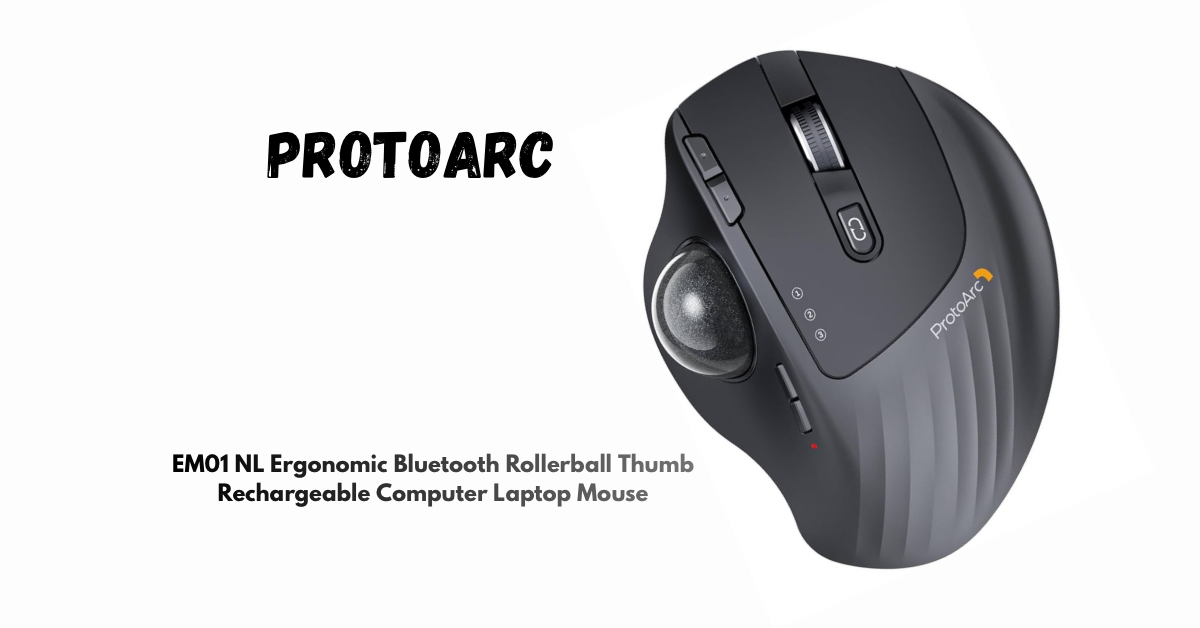
Modern computer workflows demand accuracy, comfort, and flexibility across multiple devices. Traditional mice rely on continuous arm movement and surface space, which may not always align with compact desks, multi-device setups, or precision-oriented tasks. Trackball mice address this limitation by keeping the device stationary while allowing controlled cursor movement through a rolling ball.
The ProtoArc Wireless Trackball Mouse EM01 NL is designed as a contemporary ergonomic input device that combines thumb-controlled navigation, adjustable hand positioning, and wireless multi-device connectivity. It is positioned for users who require consistent cursor control, reduced physical movement, and seamless switching between systems.
View current pricing and availability on Amazon
Affiliate link: ProtoArc Wireless Trackball Mouse EM01 NL
What This Device Is
The ProtoArc EM01 NL is a wireless thumb-operated trackball mouse. Unlike conventional optical mice that must be moved across a surface, this device remains fixed in one position. Cursor movement is controlled by rotating the trackball with the thumb, allowing precise navigation without shifting the wrist or forearm.
This design supports controlled input in environments where desk space is limited or where stationary hand positioning is preferred. The device is suitable for desktops, laptops, and multi-screen setups, and it functions effectively on flat surfaces without requiring a mouse pad.
Product Name and Model Identification
Product Name: ProtoArc Wireless Trackball Mouse EM01 NL
Brand: ProtoArc
Movement Detection Technology: Trackball
Connectivity: Bluetooth + 2.4G Wireless
Number of Buttons: 6
Power Source: Built-in rechargeable lithium battery
The EM01 NL model is identifiable by its adjustable ergonomic hinge, multi-device switching capability, and thumb-based control layout.
Key Features and Technical Details
1. Adjustable Ergonomic Angle (0–20 Degrees)
The mouse features a mechanical hinge system that allows the body to tilt between 0 and 20 degrees. This adjustment enables users to customize the hand angle according to personal comfort preferences.
- Supports a more natural wrist orientation
- Reduces the need for lateral wrist bending
- Allows personalized ergonomic positioning
2. Thumb-Controlled Trackball Navigation
The integrated trackball is operated exclusively by the thumb, enabling cursor movement without moving the mouse body.
Benefits include:
- Precise cursor control
- Minimal arm and shoulder movement
- Consistent performance in confined or cluttered spaces
This mechanism is particularly effective for document navigation, browsing, and detailed on-screen selection tasks.
3. Dual Wireless Connectivity with Three-Device Support
The EM01 NL supports two wireless connection modes:
- Bluetooth
- 2.4G wireless via USB receiver
The mouse can connect to up to three devices simultaneously, with a dedicated button allowing quick switching between systems.
Compatible platforms include:
- Windows
- macOS
- Android
- PC, laptop, and desktop systems
Note: Back and forward buttons are not supported on macOS.
4. Six-Button Layout with Quiet Clicking
The mouse is equipped with six non-programmable buttons, including primary clicks, scroll wheel, DPI control, and navigation buttons.
- Left and right clicks are designed for quiet operation
- Scroll wheel provides tactile feedback and is not silent
- Button placement supports intuitive access without hand repositioning
This makes the device suitable for shared or noise-sensitive environments.
5. Rechargeable Battery System
A built-in rechargeable lithium battery powers the device, eliminating the need for disposable batteries.
- Reduces ongoing maintenance costs
- Designed for extended usage per charge
- Power-off switch recommended when not in use for long periods
6. Adjustable DPI Levels
The cursor sensitivity can be adjusted through five DPI settings:
- 200
- 400
- 800
- 1200
- 1600
This range allows users to tailor cursor speed to different screen sizes, resolutions, and task requirements.
7. Build Quality, Color Variants, and Maintenance
The ProtoArc EM01 NL is available in multiple color options, including gray, gold, and red trackball variants. The surface features a smooth, frosted finish designed for grip and durability.
For consistent performance:
- Periodic cleaning of the trackball is recommended
- Internal support rollers should be kept free of dust
- Smooth operation may vary briefly during system startup or heavy application loading
Purchasing Information
The ProtoArc EM01 NL is available through Amazon, where updated pricing, availability, and customer reviews can be viewed.
👉 Purchase or check availability on Amazon
Amazon link : ProtoArc Wireless Mouse EM01 NL
Conclusion
The ProtoArc EM01 NL Wireless Trackball Mouse is a purpose-built input device that emphasizes ergonomic adaptability, precision control, and multi-device efficiency. Its adjustable angle, stationary operation, and thumb-controlled navigation distinguish it from traditional mouse designs, particularly in environments where space management and consistent control are priorities.
For users seeking an alternative pointing device that balances comfort, accuracy, and modern connectivity, the EM01 NL presents a well-structured and practical solution.